Writing a TNEF Parser So winmail.dat Never Leaves the Browser
Every winmail.dat converter I could find wanted me to upload the file to their server. So I implemented TNEF from scratch in TypeScript. Here is what is inside the format, and the three details that break naive implementations.
A while ago an email arrived with an attachment called winmail.dat. No usable
extension, no way to open it, no indication of what was inside. I did the obvious thing and
searched for a converter — and that is where the actual problem started.
Every service I found worked the same way: upload your file to our server and we will send back the contents. Which is a strange thing to be asked. A winmail.dat file is by definition an email somebody sent you. It might be a contract, an invoice, an internal document. Handing that to an anonymous website just to find out what is in it is backwards, and the Japanese-language guides on the subject all say so explicitly — every one of them carries some version of do not upload files containing confidential information. Everybody knew the trade was bad. There just was not an alternative.
TNEF is documented well enough to implement, and once it runs in JavaScript there is no reason for the file to go anywhere at all. So I wrote the parser. This is what I found.
What winmail.dat actually is
When Outlook sends a message in Rich Text Format, it does not send a normal MIME email with
normal attachments. It packs the whole thing — subject, formatted body, every attachment, and a
pile of Outlook-specific metadata — into a single binary blob encoded as TNEF, the Transport
Neutral Encapsulation Format, and attaches that blob as winmail.dat.
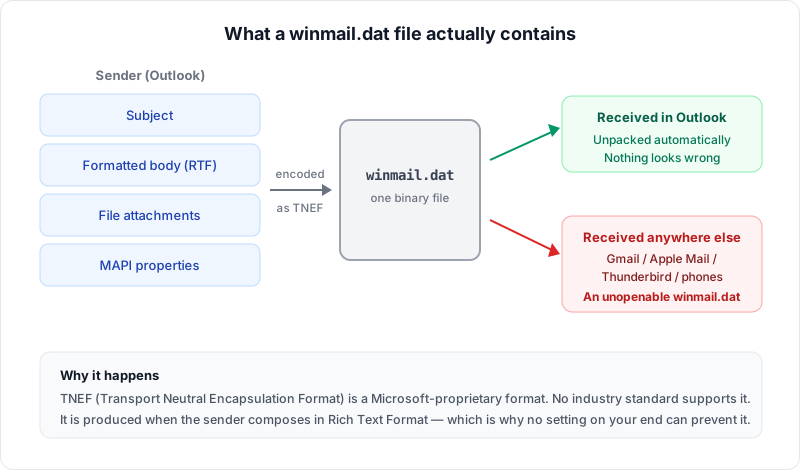
The name is a joke at this point. There is nothing transport-neutral about a proprietary format that only one vendor's client can read. And note where the fault lies: the file is produced by the sender's settings, so nothing the recipient does can prevent it.
The container is simpler than you would expect
A TNEF file opens with a 32-bit signature, 0x223e9f78, followed by a 16-bit legacy
key that nothing meaningful depends on. After that it is a flat run of attribute records until
the file ends. No tree, no index, no offsets to chase.
signature   uint32   0x223e9f78
key         uint16

repeat until EOF:
  level     uint8    1 = message, 2 = attachment
  attribute uint32   high 16 bits = data type, low 16 bits = attribute id
  length    uint32
  payload   byte[length]
  checksum  uint16   sum of payload bytes, truncated to 16 bits
Reading it is a loop. level tells you whether the record describes the message or
the attachment currently being assembled; attribute's low half tells you what it
is. The message-level attributes you care about are the subject
(0x8004), the sender (0x8000), the plain body
(0x800c), and a MAPI property block (0x9003). On the attachment side,
0x9002 opens a new attachment, 0x8010 carries its legacy filename,
0x800f carries the bytes, and 0x9005 is another MAPI block.
That took an afternoon. Then the interesting part started.
Three things that break naive parsers
1. Everything inside MAPI blocks is 4-byte aligned
A MAPI property block starts with a count, then repeats: property type, property id, then the value. String and binary values are length-prefixed — and the length tells you how many bytes are meaningful, not how many bytes were written. Values are padded up to the next 4-byte boundary.
const len = d.readUint32LE();
const bytes = d.readBytes(len);
d.skip(pad4(len) - len);   // forget this line and everything after is garbage
Miss the padding and you do not get a slightly wrong filename. You get a stream that is desynchronised by one to three bytes, after which every property type you read is nonsense, and the parser either throws or confidently returns junk. Because the failure is silent and total, it is easy to conclude the file is corrupt rather than that your reader is off by two.
2. Named properties carry a variable-length header
This one cost me the most time. MAPI property ids below 0x8000 are well-known
constants. Ids at or above 0x8000 are named properties, and they are
preceded by an extra header that is not mentioned anywhere near the description of the record
layout: a 16-byte GUID, a 4-byte kind, and then either a 4-byte id or a length-prefixed,
4-byte-padded string.
if (propId >= 0x8000) {
  d.skip(16);                       // property set GUID
  const kind = d.readUint32LE();
  if (kind === 0) {
    d.skip(4);                      // named by numeric id
  } else {
    const nameLen = d.readUint32LE();
    d.skip(pad4(nameLen));          // named by string
  }
}
If you skip a fixed number of bytes here, you will work fine against your test files and fail against somebody's real mail, because the header length depends on the name. Same failure mode as the alignment bug: total desync, no error.
3. Filenames live in four places, and the order matters
This is the one that shows up in practice, and it is why so many winmail.dat tools return Japanese filenames as mojibake.
The same attachment can carry its name in four different fields, and they do not agree.
attAttachTitle is the legacy field: an ANSI string, which in a Japanese Outlook
environment means Shift_JIS, often truncated to 8.3. The MAPI block carries better versions —
PidTagAttachLongFilename (0x3707),
PidTagAttachFilename (0x3704), and
PidTagDisplayName (0x3001) — usually as UTF-16LE.
const name =
  a.mapiLongFilename ||   // 0x3707, UTF-16LE, full name
  a.mapiFilename ||       // 0x3704
  a.mapiDisplayName ||    // 0x3001
  a.legacyName ||         // attAttachTitle, ANSI, often 8.3
  'attachment';
A parser that reads only the legacy field — the easiest one to find, since it sits right next to
the attachment data — produces exactly the symptom users complain about: a file called
8E9095948E.PDF instead of the name the sender typed.
The encoding is declared, not guessed
ANSI strings in TNEF are not any fixed encoding. Attribute 0x9007 carries an OEM
codepage number, and it governs every ANSI string that follows it in the stream. 932 is
Shift_JIS, 936 is GBK, 949 is EUC-KR, 950 is Big5, the 125x range is the Windows Latin family,
65001 is UTF-8.
Because it governs what follows, the parse is order-dependent: you have to read and apply the codepage before decoding the subject, not afterwards. It is easy to write a parser that handles attributes in whatever order is convenient and then quietly decodes a Japanese subject line as Windows-1252.
HTML bodies are hostile input
A TNEF file can contain an HTML body, and that body arrived in an email from someone you may not know. Rendering it is the whole point of the tool and also the obvious way to get owned.
Three layers: the HTML is sanitized with DOMPurify against an explicit allowlist of tags and
attributes — not a denylist — and the result is handed to a sandboxed
<iframe> whose content security policy lets it load nothing from the
network. Sanitizing alone would rely on DOMPurify never having a bypass; the iframe means that
even if something slips through, it has no access to the page around it; and the policy stops
a remote image — the usual way a sender learns that a mail was opened — from being fetched at
all.
The body that was not there: compressed RTF
For a long time the tool showed many winmail.dat files with no body at all. Usually the body was
there, as PR_RTF_COMPRESSED — Outlook's compressed RTF, which is often the only copy
of the body a winmail.dat carries. (HTML bodies had a bug of their own: the frame they were
written into never displayed them. That is fixed too.) Reading the RTF took two more Microsoft
specifications.
The compression (MS-OXRTFCP) is a small LZ77 variant. A 4,096-byte circular dictionary starts
out holding 207 bytes of common RTF words ({\rtf1\ansi\mac\deff0…); each
control byte says, bit by bit, whether the next eight tokens are literal bytes or two-byte
references into the dictionary; and a CRC over the compressed bytes catches damage. A reference
may run into the very bytes it is writing, so the copy has to go one byte at a time.
What comes out is RTF, and usually not RTF anyone wrote. When Outlook stores an HTML message
this way it wraps the HTML in RTF (MS-OXRTFEX): the tags go into
{\*\htmltag …} groups, the text stays as ordinary RTF text, and whatever
Outlook added for RTF readers sits between \htmlrtf and \htmlrtf0.
Drop that last part, keep the rest, and the original HTML comes back, ready for the same
sanitizer as any other HTML body. RTF written
as rich text has no HTML inside, so it is reduced to its text.
The Japanese part was the lesson of the encoding section again. The RTF declares its code page
(\ansicpg932) and each font its character set, and a double-byte character arrives
as two separate escapes, \'82\'a0, so the bytes have to be gathered and decoded
together.
The payoff of doing it in the browser
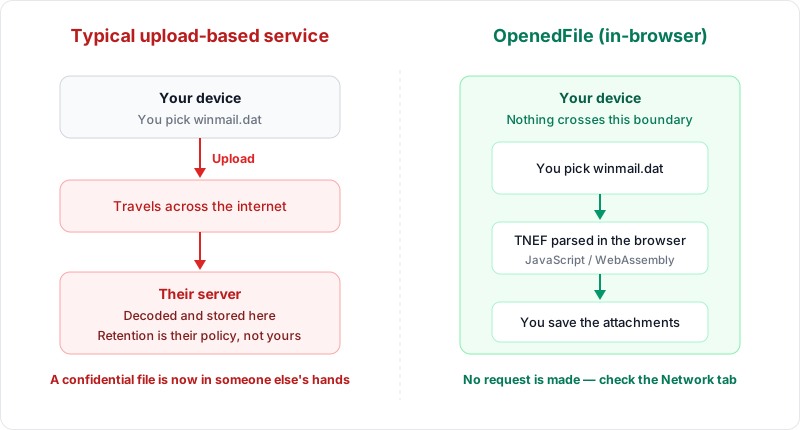
Once the decoder is JavaScript, the file has no reason to move. There is no upload, no server to breach, no retention policy to read, and no reason for you to take my word for any of it — open your browser's Network tab and convert something. You will see the page load, and then nothing.
The honest costs: a very large file on a low-memory phone is bounded by that device rather than by a server, and encrypted or signed S/MIME payloads inside a TNEF container are not decoded. Both seem like a reasonable price for not handing over the file.
Try it
The result is the winmail.dat viewer on this site. Drop a file in; it shows the subject, sender and body, and lets you pull out every attachment. No upload, no account, no size limit that I impose.
If you have a winmail.dat that it opens wrong, I would genuinely like to know — the format has more corners than one person's mail collection can cover. Tell me about it.
Frequently asked questions
Why not use an existing library?
Are there winmail.dat files it cannot read?
Could this be ported to another language?
About the author
Ren
Developer, OpenedFile
I build and maintain OpenedFile on my own. It started when a winmail.dat attachment landed in my inbox and nothing would open it — and every online converter I found wanted me to upload the file to their server first. So I wrote a TNEF parser from scratch instead, and every tool here has run entirely in the browser ever since.
More about OpenedFile