Open Outlook .msg Files
Read a .msg without Outlook installed. Message, headers and attachments — all in your browser, nothing uploaded.
Your files stay safe — processed entirely in your browser. Nothing is uploaded.
Drop a .msg file here
or click to select a file
Outlook message files (.msg). Nothing is uploaded.
How to open a MSG file without Outlook
A .msg file is one email saved by Outlook exactly as it was. It arrives when someone drags a message out of Outlook and attaches it, or when a message is kept as a record and passed on. Inside is not just the body, but the sender, recipients, timestamp, and every attachment the original message carried.
Double-clicking does nothing because .msg is an Outlook-only format. On a PC without Outlook, on a Mac, or on a phone, you are only asked which app to use. The file is not damaged. This page reads that .msg in your browser and gets the attachments back out.
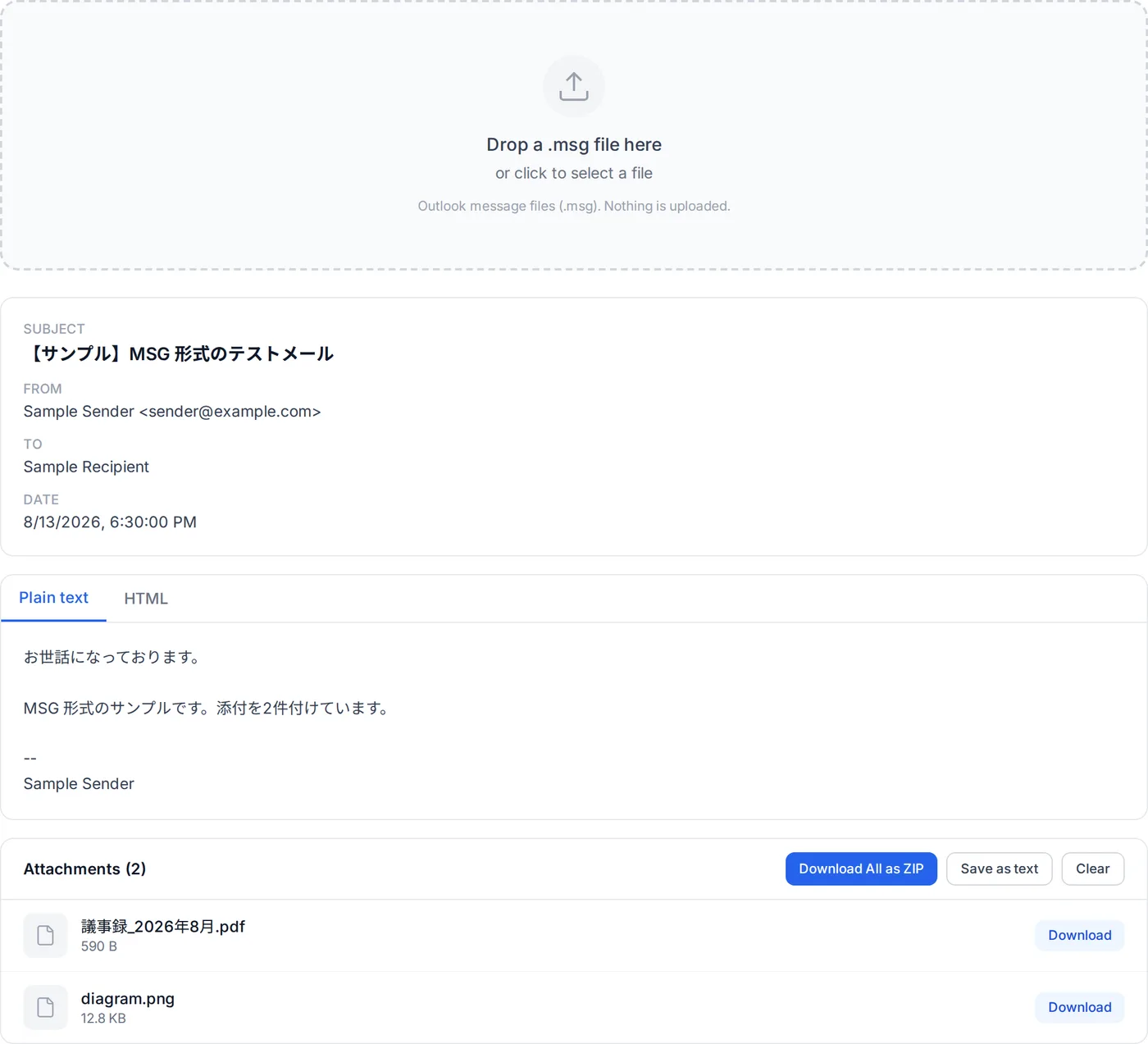
Drop the .msg file
Drag the .msg that came with the email onto the box above, or click to choose it. Outlook is not needed.
Check who sent it and when
Subject, sender, recipients and timestamp appear first. Even for a message forwarded so many times the original details were lost, they are here.
Read the message
Formatted mail is laid out properly. HTML mail is rendered in a sandboxed form that makes no outside requests.
Get the attachments
Everything attached to the original message is listed. Save them one at a time or all at once as a ZIP. Japanese file names come out intact.
If you have Outlook, double-clicking the .msg simply opens it. Without it you have three options: a browser viewer like this one, importing the file into a mail client such as Thunderbird, or asking the sender to resend the message as .eml. When you are in a hurry, or cannot install software on a work machine, the browser is the quickest of the three.
How this MSG viewer works
A .msg is not an email file in the usual sense. It is a compound file — a small FAT filesystem inside a single file — and the message is spread across streams named after the MAPI property each one holds.
That container is the same one .doc, .xls and .ppt use, which is why all four share a single signature and have to be told apart by what is stored inside them.
- Reading the container
- The reader walks the CFB structures directly: the header, the FAT and its DIFAT continuation, the directory tree, and the mini FAT. No library sits in between, so nothing has to be uploaded for a server to do it.
- The mini stream matters
- Streams under 4096 bytes are packed into 64-byte mini sectors carved out of one ordinary stream. Almost every MAPI property in a message is that small, so a reader that skips the mini FAT reads essentially nothing. Both paths are covered and both are tested.
- Property streams
- Each property is a stream called __substg1.0_ followed by the property id and type in hex — 0037001F is the subject as Unicode, 0037001E the same subject in the Windows code page of the PC that saved it. Outlook does not always record which code page that was (PR_MESSAGE_CODEPAGE), so it is otherwise inferred from the mail's encoding and locale: a Japanese mail that arrived as ISO-2022-JP was stored in Shift_JIS. Fixed-length values such as timestamps are packed into __properties_version1.0 instead.
- Filename resolution
- Attachment names come from PidTagAttachLongFilename (0x3707), then PidTagAttachFilename (0x3704), then PidTagDisplayName (0x3001). Reading only the short name is what produces 8.3 mojibake for Japanese filenames — the same trap as in winmail.dat, and handled the same way here.
- HTML bodies
- PR_HTML is binary and keeps the mail's own encoding (PR_INTERNET_CPID) rather than being Unicode like the other text. Once decoded it is sanitized with DOMPurify against an explicit allowlist and rendered inside a sandboxed iframe whose content security policy lets it load nothing from the network.
- Bodies stored as compressed RTF
- Where the HTML or the plain-text body is missing, the compressed RTF body (PR_RTF_COMPRESSED) fills the gap. It is decompressed (MS-OXRTFCP); an HTML message wrapped in RTF comes back as that HTML (MS-OXRTFEX), and anything else is reduced to text. If the RTF is damaged and there is no other body, the viewer says so.
Where it stops
Messages embedded inside other messages are listed but not opened as messages. A body that exists only as compressed RTF is shown, but RTF written as rich text comes out as plain text, without its formatting. Encrypted or signed S/MIME content is not decrypted.
Frequently Asked Questions
What is a .msg file?
Do I need Outlook installed?
Is my message uploaded anywhere?
Can I get the attachments out?
Why do other tools show Japanese attachment names as gibberish?
What is the difference between .msg and .eml?
Are there messages this cannot open?
Related articles
How to Open a .msg File Without Outlook: Three Ways
.msg is Outlook's own format; Gmail, Apple Mail and Thunderbird cannot read it. How to open one in your browser right now, in Outlook, or with a free viewer — and why some open with an empty body.
What Is an EML File? What Is Inside, and What to Do When One Won't Open
An EML file is one email saved as text in the internet mail format (RFC 5322 and MIME). A sample file read line by line, which apps save and open .eml, and what to check when one will not open, shows garbled text or has no body.
How to Open EML Files Without Outlook
You can open a .eml file without Outlook. Four ways, with steps, following Microsoft's and Mozilla's own information: in your browser right now, with the new Outlook built into Windows, with Thunderbird, or in a text editor.
EML vs MSG: Which to Choose When You Save an Email
EML and MSG compared by what is inside, which apps open them and how each app saves a message — classic Outlook, new Outlook, Outlook on the web, Gmail and Apple Mail — and which to pick when you are not sure.