Understanding Outlook's TNEF Encoding
A deep dive into Microsoft's Transport Neutral Encapsulation Format and why it causes winmail.dat attachments.
If you have ever received a mysterious winmail.dat attachment in your email, you have encountered the effects of a Microsoft technology called TNEF. While most email users only experience TNEF as an annoyance, the format itself has a fascinating technical history and a surprisingly complex internal structure. In this article, we take a deep dive into what TNEF is, how it works, and why it continues to cause problems decades after its creation.
What Is TNEF?
TNEF stands for Transport Neutral Encapsulation Format. It is a proprietary binary format developed by Microsoft for encoding email messages that contain rich formatting and attachments. When Microsoft Outlook sends a message using Rich Text Format (RTF), it encapsulates the entire message, including its formatting, metadata, and attachments, into a TNEF-encoded binary stream. This stream is then attached to the email as a file typically named winmail.dat.
The "transport neutral" part of the name refers to the idea that the format is independent of any specific email transport protocol. Whether the email is sent via SMTP, X.400, or another protocol, the TNEF blob can ride along as an attachment. In practice, however, TNEF is almost exclusively associated with SMTP email sent from Microsoft Outlook and Exchange Server.
The History of TNEF
TNEF has its roots in the early 1990s, when Microsoft was developing its Exchange Server platform and the Outlook email client. At the time, email standards were relatively primitive. The basic SMTP protocol supported only plain ASCII text, and MIME (Multipurpose Internet Mail Extensions) was still evolving. Rich formatting, embedded objects, and complex attachments were not well supported by the standards of the era.
Microsoft needed a way to preserve the rich features of its messaging platform when emails were sent between Exchange servers and Outlook clients. TNEF was the solution. It allowed Outlook to encode all of its proprietary message properties, including RTF formatting, voting buttons, custom forms, and MAPI properties, into a single binary package that could be transmitted as an email attachment.
In the early days of Exchange, most organizations used Outlook internally, and TNEF worked seamlessly within those environments. The problems began when organizations started communicating more frequently with external recipients who used different email clients. As email became more interconnected and diverse, TNEF's proprietary nature became an increasingly significant source of compatibility issues.
How TNEF Encoding Works Technically
When Outlook sends a message using RTF formatting, the following process occurs:
- Outlook composes the message with all its rich content, including formatted text, embedded images, attachments, and metadata.
- The Outlook client serializes the entire message into a TNEF binary stream. This stream encodes each component of the message as a series of attributes with associated data.
- The TNEF stream is attached to a MIME email as an attachment with the content type application/ms-tnef and the filename winmail.dat.
- A plain text or simplified HTML version of the message body may also be included in the MIME structure as a fallback for non-TNEF clients.
- The email is sent via SMTP to the recipient's mail server.
When the receiving client is Outlook or another TNEF-aware application, it detects the application/ms-tnef attachment, decodes the TNEF stream, and reconstructs the original rich message. When the receiving client is not TNEF-aware, it simply presents the winmail.dat file as an opaque binary attachment.
Binary Format Structure
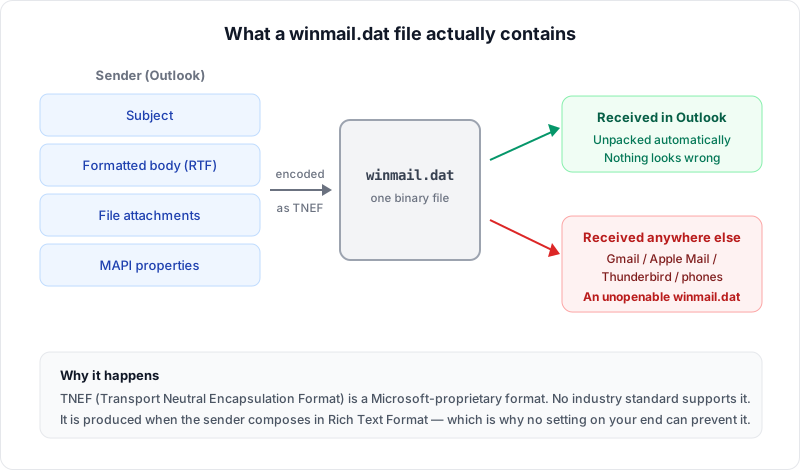
The TNEF binary format has a well-defined structure, although Microsoft did not publish a full specification until relatively recently. The format consists of the following components:
TNEF Signature and Version
Every TNEF stream begins with a 32-bit signature value (0x223E9F78) followed by a 16-bit version number. The signature allows applications to quickly identify a file as TNEF-encoded. If a file begins with these specific bytes, it is almost certainly a winmail.dat or similar TNEF stream.
Did You Know?
The TNEF magic signature 0x223E9F78 is one of the most reliable file identification markers in computing. Any file starting with these four bytes is almost certainly a TNEF-encoded winmail.dat. This is how decoder tools instantly recognize the format before parsing the rest of the data.
Attribute Structure
After the header, the TNEF stream consists of a series of attributes. Each attribute has a fixed structure:
- Level (1 byte): Indicates whether the attribute applies to the message as a whole or to a specific attachment. Message-level attributes use the value 0x01, while attachment-level attributes use 0x02.
- Attribute ID (2 bytes): A numeric identifier that specifies the type of data contained in the attribute (e.g., subject line, message body, attachment data).
- Attribute Type (2 bytes): Specifies the data type of the attribute value.
- Length (4 bytes): The size of the attribute data in bytes.
- Data (variable): The actual attribute data.
- Checksum (2 bytes): A 16-bit checksum for data integrity verification.
Key Attributes
Some of the most important TNEF attributes include:
- attSubject: The email subject line
- attBody: The plain text message body
- attMAPIProps: A collection of MAPI properties (this is where most of the rich data lives)
- attAttachData: The binary data of a file attachment
- attAttachTitle: The filename of an attachment
- attDateModified: The modification date of the message or attachment
MAPI Properties Inside TNEF
One of the most significant aspects of TNEF is its ability to carry MAPI properties. MAPI (Messaging Application Programming Interface) is Microsoft's framework for email and messaging applications. MAPI defines hundreds of properties that describe every aspect of an email message, from basic fields like sender and subject to complex properties like voting responses, custom form definitions, and calendar data.
The attMAPIProps attribute in a TNEF stream contains a serialized collection of these MAPI properties. This is what allows Outlook to preserve features that have no equivalent in standard email formats. For example, when Outlook sends a message with voting buttons ("Approve / Reject"), the voting button definitions are encoded as MAPI properties within the TNEF stream.
While this approach ensures feature fidelity between Outlook clients, it also means that a significant portion of the message data is locked inside a proprietary format that other clients cannot interpret. The MAPI property data is one of the primary reasons that TNEF exists: without it, Outlook would lose many of its advanced messaging features when communicating with other Outlook users.
Why Outlook Uses TNEF
Microsoft Outlook uses TNEF primarily for three reasons:
- Feature preservation: TNEF allows Outlook to transmit features that have no standard equivalent, such as voting buttons, meeting requests in proprietary format, custom forms, and rich RTF formatting with embedded OLE objects.
- Backward compatibility: TNEF has been part of the Outlook/Exchange ecosystem for decades. Removing it would break compatibility with older systems and workflows that depend on these proprietary features.
- Internal communication: Within organizations that use Outlook and Exchange exclusively, TNEF provides a seamless rich messaging experience. The problems only arise when messages leave the Microsoft ecosystem.
Problems Caused by TNEF
Despite its technical capabilities, TNEF causes significant practical problems:
- Attachment loss: When a non-Outlook recipient receives a TNEF-encoded message, the original file attachments are trapped inside the winmail.dat file and appear to be missing.
- Formatting loss: The fallback plain text version of the message often lacks formatting, images, and other visual elements that the sender included.
- Confusion and frustration: Recipients who are unfamiliar with winmail.dat may not know how to access their attachments, leading to delays and miscommunication.
- Professional impact: In business contexts, sending winmail.dat files can appear unprofessional and may cause recipients to question the sender's technical competence.
- Support burden: IT departments spend considerable time troubleshooting winmail.dat issues and configuring Outlook settings to prevent them.
Important
TNEF encoding is one of the most common causes of "missing" email attachments. If a recipient reports that your files did not arrive, the most likely culprit is Outlook sending a winmail.dat instead of standard MIME attachments. Switching to HTML format in Outlook resolves this immediately.
How Email Clients Handle TNEF
Different email clients handle TNEF-encoded messages in different ways:
- Microsoft Outlook: Fully supports TNEF. Decodes winmail.dat automatically and displays the message with all its rich features.
- Apple Mail: Has limited TNEF support in newer versions. Some attachments may be extracted, but rich formatting and proprietary features are lost.
- Gmail (web): Generally handles TNEF reasonably well by extracting basic attachments, though complex TNEF structures may still produce a winmail.dat download.
- Mozilla Thunderbird: Requires a plugin (such as LookOut) to decode TNEF attachments. Without the plugin, winmail.dat appears as an unopenable attachment.
- Mobile email apps: Most mobile email applications on iOS and Android cannot decode TNEF and will present winmail.dat as an attachment.
For any client that cannot handle TNEF natively, a dedicated decoder tool is needed. Our Winmail.dat Viewer works in any modern browser and can extract all contents from TNEF-encoded files instantly.
Alternatives to TNEF
Modern email standards provide alternatives that accomplish most of what TNEF was designed to do:
- HTML email: The HTML format supports rich formatting, embedded images, and styled text without requiring proprietary encoding. Outlook fully supports sending HTML email as an alternative to RTF.
- Standard MIME attachments: Files can be attached using standard MIME encoding, which is universally supported by all email clients.
- iCalendar (ICS): Calendar invitations can be sent using the iCalendar standard, which is supported by virtually all modern calendar applications.
- vCard: Contact information can be shared using the vCard standard rather than proprietary MAPI contact properties.
Recommended
Switch Outlook's default email format from Rich Text to HTML. HTML provides rich formatting, embedded images, and styled text while remaining universally compatible with all email clients. This single change eliminates winmail.dat for most users.
By switching from RTF to HTML format in Outlook's settings, users can avoid TNEF encoding entirely while still sending richly formatted emails with attachments.
The Future of TNEF
TNEF is increasingly becoming a legacy technology. Microsoft has been gradually moving away from TNEF dependence in its newer products. Outlook for the web (OWA) does not use TNEF, and the new Outlook for Windows is built on web technologies that favor standard email formats. Microsoft 365 administrators can disable TNEF encoding at the organizational level.
However, TNEF is unlikely to disappear completely in the near term. Many organizations still rely on older versions of Outlook and Exchange Server, and some Outlook features still depend on MAPI properties that can only be transmitted via TNEF. As long as there are Outlook users sending RTF-formatted emails, winmail.dat files will continue to appear in inboxes around the world.
In the meantime, tools like our Winmail.dat Viewer provide an essential bridge, allowing anyone to decode TNEF-encoded files regardless of their email client or operating system.
Conclusion
TNEF is a technically sophisticated format that solved a real problem in the early days of rich email messaging. However, its proprietary nature has made it one of the most persistent sources of email incompatibility. Understanding how TNEF works, from its binary structure to its MAPI property encoding, helps demystify the winmail.dat phenomenon and equips both end users and IT professionals with the knowledge they need to deal with it effectively.
Whether you are troubleshooting winmail.dat files for your organization or simply trying to open one that landed in your inbox, knowing what TNEF is and why it exists is the foundation for solving the problem. And when you need a quick solution, our browser-based Winmail.dat Viewer is always just a click away.
Related Articles
What Is a Winmail.dat File?
The complete guide to understanding winmail.dat files and how to open them.
How to Prevent Winmail.dat
Configure Outlook to stop sending winmail.dat files to your recipients.
How to Open Winmail.dat on Mac
Step-by-step guide for macOS users dealing with winmail.dat attachments.
About the author
Ren
Developer, OpenedFile
I build and maintain OpenedFile on my own. It started when a winmail.dat attachment landed in my inbox and nothing would open it — and every online converter I found wanted me to upload the file to their server first. So I wrote a TNEF parser from scratch instead, and every tool here has run entirely in the browser ever since.
More about OpenedFile