Privacy Risks of Online File Converters
Why uploading your files to online conversion tools is risky and what alternatives exist.
The Hidden Cost of "Free" Converters
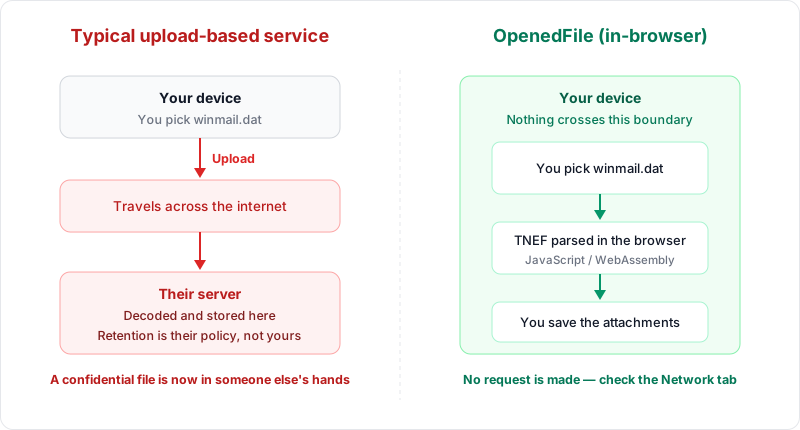
Every day, millions of people visit online file conversion websites to perform simple tasks: converting an image from WebP to JPG, turning a HEIC photo into PNG, extracting attachments from a winmail.dat file, or transforming a document from one format to another. These tools are convenient, usually free, and require no software installation. But there is a cost that most users never consider: your privacy.
When you upload a file to an online converter, you are sending a copy of that file to a remote server owned by a company you likely know nothing about. That file could contain personal photos, sensitive business documents, private emails, or confidential data. Once it leaves your device, you have no control over what happens to it. This article examines the real privacy risks of online file converters and presents safer alternatives.
What Happens When You Upload Files
To understand the risk, you need to understand the mechanics of server-side file conversion. When you use a traditional online converter, the following steps occur:
- Upload — Your file is transmitted over the internet to the converter's server. Even with HTTPS encryption, the file is fully accessible to the server once it arrives.
- Server processing — The server receives your file, stores it (at least temporarily), performs the conversion, and generates the output file.
- Storage — Your original file and the converted version are stored on the server, often for an unspecified period. Some services claim to delete files after a few hours, but there is no way for you to verify this.
- Download — You download the converted file back to your device.
During this process, your file exists on a server you do not control. It may be stored on disk, cached in memory, copied to backup systems, logged in access records, or even moved to secondary storage. The server operator has full access to your file and, depending on their terms of service, may use it in ways you did not anticipate.
Important
Several file conversion services have suffered data breaches exposing user-uploaded files. When a converter stores millions of files from users worldwide, it becomes a high-value target for hackers. Misconfigured cloud storage buckets have also led to uploaded files being publicly accessible on the internet without authentication.
Real-World Privacy Incidents
Privacy concerns about online converters are not hypothetical. There have been numerous real-world incidents that illustrate the risks:
- Data breaches at conversion services — Several file conversion websites have suffered security breaches that exposed user-uploaded files to unauthorized access. When a converter stores millions of files from users worldwide, it becomes an attractive target for hackers.
- Exposed storage buckets — Some conversion services store files in cloud storage services like Amazon S3 or Google Cloud Storage. Misconfigured access permissions have led to situations where uploaded files were publicly accessible on the internet without any authentication.
- Malware distribution — Security researchers have found that some free file conversion websites inject malware or adware into converted files. When you download your "converted" file, you may unknowingly download malicious code along with it.
- Government surveillance — Files uploaded to servers in certain jurisdictions may be subject to government surveillance or data retention requirements, depending on local laws.
Types of Sensitive Data at Risk
Consider the types of files people routinely upload to online converters:
- Personal photographs — Photos from your phone often contain EXIF metadata including GPS coordinates (where the photo was taken), timestamps, and device information. Uploading these to a converter exposes both the images and their metadata.
- Business documents — Contracts, proposals, financial statements, internal communications, and strategic plans are regularly converted between formats. Leaking these documents could have serious business consequences.
- Medical records — Images of prescriptions, lab results, medical imaging, and health documents are frequently converted for sharing with healthcare providers.
- Legal documents — Court filings, legal correspondence, and contracts often need format conversion. These documents may contain privileged information protected by attorney-client confidentiality.
- Email attachments — Files like winmail.dat contain email attachments that may include any of the above categories. Opening these through an online service exposes the contents to a third party.
- Identity documents — Scans of passports, driver's licenses, social security cards, and other ID documents are sometimes converted between formats. This is perhaps the most dangerous type of file to upload to an unknown service.
How Converter Services May Use Your Data
Even if a conversion service does not suffer a breach, there are ways your data might be used that you may not expect:
Training Machine Learning Models
With the explosive growth of artificial intelligence, large datasets of images and documents are extremely valuable. Some conversion services may use uploaded files to train computer vision models, natural language processing systems, or other AI applications. Your personal photos could end up as training data for a facial recognition system.
Data Reselling
Some services operate on a business model where the "free" conversion is subsidized by monetizing user data. This could involve selling aggregated usage data, metadata, or even file contents to third-party data brokers.
Advertising and Profiling
Conversion services that display ads may analyze your uploaded files to build a profile for targeted advertising. If you convert a real estate document, you might start seeing ads for mortgage services. If you convert wedding photos, you might see ads for honeymoon packages.
Indefinite Retention
Many services claim to delete files within hours or days, but there is no independent verification of these claims. Backup systems, log files, and caching layers may retain copies of your files long after the stated deletion period.
Reading the Fine Print
Most online converters have Terms of Service (ToS) and Privacy Policies that users never read. When analyzed carefully, these documents often reveal concerning provisions:
- Broad license grants that give the service the right to "use, store, reproduce, modify, and distribute" uploaded content.
- Vague data retention policies that say files "may" be deleted after a period but do not guarantee it.
- Third-party sharing clauses that allow the service to share your data with "partners," "affiliates," or "service providers" without specifying who these entities are.
- Disclaimers of liability for data breaches, effectively leaving you without recourse if your files are exposed.
- Jurisdiction clauses that place the service under laws in countries with weak privacy protections.
Important
Always read the Terms of Service before using an online converter. Many include broad license grants giving the service the right to "use, store, reproduce, modify, and distribute" your uploaded content. Vague deletion policies and third-party sharing clauses are common red flags.
The reality is that most people do not read these documents, and even those who do may not fully understand the implications. The safest approach is to avoid uploading sensitive files to any remote service in the first place.
The Alternative: Client-Side Processing
The good news is that modern web technology has made it possible to build file conversion tools that process everything locally in your browser, without ever uploading your files to a server. This approach is called client-side processing, and it eliminates virtually all of the privacy risks described above.
With client-side processing, the conversion code (JavaScript, WebAssembly) is downloaded to your browser, and all file processing happens on your own device. Your files never leave your computer, tablet, or phone. There is nothing to intercept, nothing to store, and nothing to breach.
Recommended
Use client-side processing tools that convert files entirely in your browser. Your files never leave your device, eliminating risks of data breaches, unauthorized access, and indefinite retention. You can verify this yourself using your browser's Network tab.
How Browser-Based Tools Work Differently
A true client-side converter works like this:
Open the Converter Webpage
You open the converter webpage, which downloads the conversion code to your browser. This is the only data transferred from the server.
Select Your File
You select or drag-and-drop your file. The file is read by JavaScript using the File API and processed entirely in the browser's memory.
Browser Performs the Conversion
The conversion is performed using technologies like the HTML5 Canvas API, WebAssembly, or Web Workers — all running locally on your device.
Download the Result
The converted file is generated in the browser and offered for download directly from your device's memory. No server receives the output.
Your File Never Leaves Your Device
At no point does any file data leave your device. No network request is made with your file's contents. You can verify this in the browser's Network tab.
Verifying That a Tool Truly Processes Locally
You do not have to take a tool's word for it. You can verify client-side processing yourself using your browser's developer tools:
Open the Network Tab
Open the browser's Network tab by pressing F12, then clicking "Network". This shows all network requests the page makes.
Clear the Network Log
Clear the network log so you start with a clean slate. This lets you see only the requests made during the conversion.
Perform the Conversion
Select your file and run the conversion as you normally would.
Check for File Uploads
Check the Network tab. If the tool truly processes locally, you will see no outgoing requests containing your file data. You may see requests for static assets like JavaScript files, CSS, or fonts, but there should be no upload of your actual file.
You can also test by disconnecting from the internet after the page has loaded. A true client-side tool will continue to work offline, since it does not need a server connection to process your files.
Why OpenedFile Processes Everything Locally
OpenedFile was built from the ground up with privacy as a core principle. Every tool on the platform, whether it is the WebP converter, the HEIC converter, or the winmail.dat viewer, processes files entirely in your browser. No files are uploaded, no data is stored, and no accounts are required.
This is not just a feature; it is a fundamental design decision. By eliminating server-side processing, OpenedFile eliminates the entire category of privacy risks associated with traditional online converters. There is nothing to breach because there is nothing stored. There is nothing to intercept because there is nothing transmitted.
Conclusion and Recommendations
Online file converters are convenient, but the privacy trade-off is significant. When you upload files to a remote server, you expose potentially sensitive data to risks including data breaches, unauthorized access, data mining, and indefinite retention. These risks apply to personal photos, business documents, legal files, and any other content you might need to convert.
The safest approach is to use tools that process files locally in your browser. Before using any online converter, ask yourself:
- Does this tool require me to upload my file to a server?
- Would I be comfortable if this file were made public?
- Have I verified the tool's privacy claims using the browser's Network tab?
If you are not confident in the answers, choose a client-side tool instead. Your files contain your data, your memories, and your business. They deserve to stay under your control.
Related Articles
Why Client-Side Processing Is Safer for Your Files
How browser-based file processing protects your privacy compared to server-side conversion tools.
WebP Format Explained: Everything You Need to Know
A comprehensive guide to Google's WebP image format — features, benefits, limitations, and conversion.
HEIC vs JPG: The Complete Comparison Guide
Compare Apple's HEIC format with the universal JPG standard across quality, size, and compatibility.
About the author
Ren
Developer, OpenedFile
I build and maintain OpenedFile on my own. It started when a winmail.dat attachment landed in my inbox and nothing would open it — and every online converter I found wanted me to upload the file to their server first. So I wrote a TNEF parser from scratch instead, and every tool here has run entirely in the browser ever since.
More about OpenedFile